
Rakuten Golf Score Management App
Overview
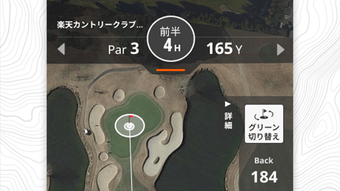
The Rakuten Golf Score Management App is a free lifestyle tool designed to enhance the golfing experience for players across Japan. It serves as a comprehensive course management system, offering features such as GPS course mapping, drone aerial video integration, and distance measurement. These tools are intended to support strategic play by providing accurate visual and spatial data during rounds.
The app enables users to log scores efficiently, analyze swing trends, and track performance over time. It also includes social functionality, allowing golfers to connect via chat and share photo scorecards on social media. A direct link to Rakuten GORA reservation services is integrated, streamlining course booking.
The app is tailored for golf enthusiasts seeking a more organized, data-driven, and socially engaging way to enjoy the game. While the developer, Rakuten Group, Inc., is known for digital services in Japan, specific details about the app’s development background were not provided. Real-world usage scenarios include pre-round planning, in-game navigation, post-round analysis, and community interaction.
The app aims to merge practical functionality with entertainment, making it suitable for casual players and dedicated golfers alike.
Key Features & Capabilities
- GPS Course Map – Provides a detailed, real-time layout of golf courses, helping users visualize hole positions, hazards, and terrain. This feature supports strategic decision-making during play.
- Drone Aerial Video – Offers high-resolution aerial footage of each course, giving users a bird’s-eye view of course design and layout. This enhances course familiarity before and during rounds.
- Distance Measurement – Utilizes GPS technology to measure distances to greens, hazards, and other key points on the course. This assists in club selection and shot planning.
- Score Logging & Analysis – Allows users to input scores quickly and access historical data to track performance trends, including swing accuracy and consistency.
- Photo Scorecard Sharing – Enables users to capture and share scorecards as images on social media, promoting engagement and visibility within the golfing community.
- Chat Functionality – Facilitates communication between users, supporting real-time interaction during or after rounds.
- Reservation Integration – Direct access to Rakuten GORA for booking tee times, improving workflow efficiency for course planning.
Practical Use Cases
Players can use the GPS course map to rehearse shots before stepping onto the course. The drone video feature is particularly useful for new or visiting courses. Distance measurement supports accurate club choice, reducing guesswork. Post-round, users can analyze their score trends and compare performance with peers. The social features encourage participation in golf communities, while the reservation link simplifies scheduling.
User Interface, Workflow & Performance
The app’s interface appears to be structured around intuitive navigation, with a focus on visual clarity and quick access to core features. The layout likely prioritizes course maps, score input, and real-time data during gameplay. Users can expect a streamlined workflow for logging scores and accessing historical records.
The app’s performance is expected to be stable on modern Android and iOS devices, though exact resource usage details were not specified. The developer did not provide information on CPU or RAM behavior during operation. General software behavior suggests responsive interactions, but real-world performance may vary depending on device capabilities and network conditions.
Stability during extended use, such as full rounds, has not been confirmed. Users should ensure their device meets basic requirements for GPS and location services to fully utilize the app’s functionality. No reported issues with crashes or freezes were mentioned in the provided materials.
Compatibility & System Requirements
The app is available for both Android and iOS platforms, ensuring broad accessibility for mobile users. The current version is 1.0.0, with an installation size of 45.2 MB. This indicates a lightweight footprint, suitable for devices with moderate storage capacity.
The developer did not specify exact system requirements, including minimum OS versions or hardware specifications. Compatibility information was partially provided, with no mention of specific processor types, RAM, or GPU capabilities. Users should verify that their device supports GPS functionality and has access to location services for full feature utilization.
The app may require internet connectivity for real-time map updates and drone video streaming. Offline functionality was not detailed in the provided information.
Pros and Cons
Pros
- Free to download and use, removing cost barriers for golfers.
- Comprehensive GPS course mapping with drone aerial video for enhanced course awareness.
- Integrated distance measurement supports strategic shot planning.
- Seamless score logging and performance trend analysis.
- Direct reservation link to Rakuten GORA improves scheduling convenience.
- Photo scorecard sharing and chat features boost social engagement.
Cons
- Exact system requirements were not listed, which may affect compatibility on older devices.
- Performance under low network conditions or high GPS load was not specified.
- Offline mode functionality is unclear, potentially limiting use in remote areas.
- Advanced analytics features may require additional user input or data accumulation.
FAQ Section
Is the app free to use?
Yes, the Rakuten Golf Score Management App is available at no cost. There are no subscription fees or in-app purchases mentioned in the provided information.
Which devices support the app?
The app is compatible with Android and iOS devices. Specific minimum OS versions were not provided.
Does the app require an internet connection?
Yes, an active internet connection is required for GPS mapping, drone video streaming, and real-time score synchronization. Offline functionality is not detailed.
Can I use the app without a Rakuten account?
The developer did not specify whether a Rakuten account is required for full functionality. Basic features may be accessible without one, but integration with Rakuten GORA may require account access.
How often is the app updated?
Version 1.0.0 was released on May 15, 2024. The update frequency is not specified, but the developer is expected to release updates to maintain compatibility and fix potential issues.
Final Thoughts + CTA
The Rakuten Golf Score Management App presents a compelling option for golfers seeking a modern, data-informed, and socially connected way to enjoy the sport. With its GPS course maps, drone aerial videos, and distance measurement tools, it offers tangible benefits for strategic play and course navigation. The integration of scorekeeping, performance analysis, and social sharing enhances both the personal and community aspects of golf.
While some technical details such as system requirements and offline capabilities remain unspecified, the app’s lightweight size and free access make it accessible to a wide audience. It is particularly well-suited for golfers who value organization, real-time data, and seamless course booking. For those looking to elevate their game and connect with fellow players, this app delivers strong value.
Download Rakuten Golf Score Management App now.







